



WPForms WordPress Plugin – Drag & Drop Form Builder Guide
WPForms is a powerful WordPress form builder plugin designed to help website owners create professional forms quickly without coding. It provides a beginner-friendly drag and drop interface for creating contact forms, payment forms, surveys, subscription forms, and many other types of online forms.
The plugin is widely used by bloggers, businesses, agencies, WooCommerce stores, and developers who need a flexible solution for collecting information from website visitors. WPForms focuses on simplicity while providing advanced features such as conditional logic, integrations, templates, and automation tools.
Table of Contents
- What is WPForms
- Key Features
- Drag and Drop Form Builder
- Contact Forms
- Payment Forms
- Survey and Poll Forms
- Email Marketing Integrations
- Templates Library
- Spam Protection
- Performance Optimization
- System Requirements
- How to Install WPForms
- Why Choose WPForms
- Who Should Use WPForms
- Pros and Cons
- Frequently Asked Questions
- Conclusion
What is WPForms
WPForms is a WordPress form builder plugin that allows users to create different types of online forms through a visual editor.
It is commonly used for:
- Contact forms
- Business inquiry forms
- Newsletter signup forms
- Payment forms
- Survey forms
- Registration forms
- Customer feedback forms
The plugin is designed for both beginners and advanced WordPress users who need an efficient way to collect and manage website submissions.
Key Features of WPForms
Drag and Drop Form Builder
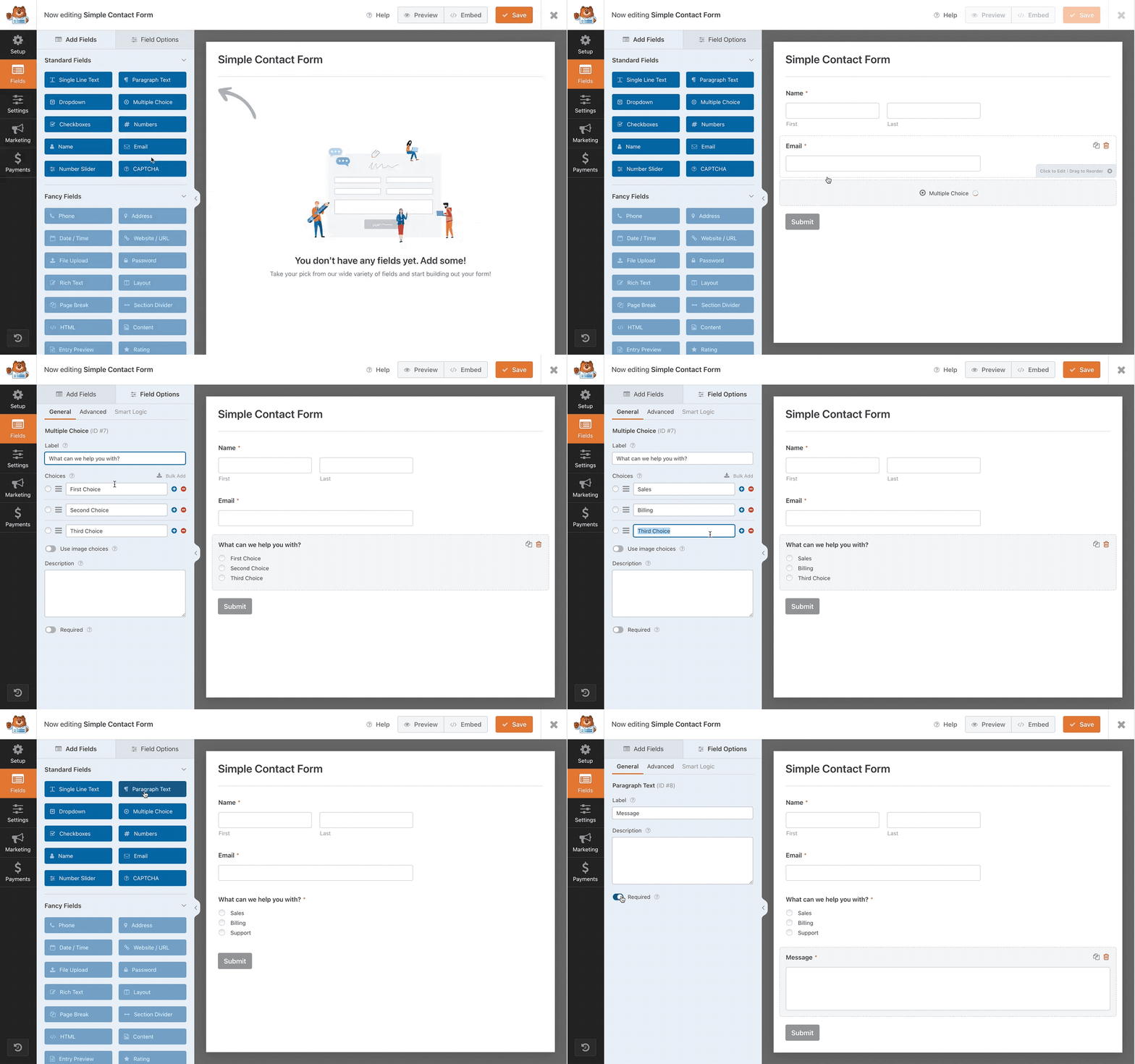
The biggest advantage of WPForms is its visual drag and drop form builder.
Users can create forms by adding fields such as:
- Name fields
- Email fields
- Dropdown menus
- Checkboxes
- File uploads
- Payment fields
- Date and time fields
No programming knowledge is required.
Contact Form Builder
WPForms makes it easy to create professional contact forms for websites.
Features include:
- Custom fields
- Email notifications
- Confirmation messages
- Spam protection
- Mobile-friendly layouts
Businesses can use these forms to collect customer inquiries and improve communication.
Payment Forms
WPForms supports online payment forms for collecting payments directly through WordPress websites.
Payment features include:
- Donation forms
- Order forms
- Subscription forms
- Payment calculations
- Payment gateway integration
These features make WPForms suitable for businesses, nonprofits, and online services.
Survey and Poll Forms
WPForms provides tools for creating interactive surveys and polls.
Common uses include:
- Customer feedback
- Market research
- User opinions
- Website questionnaires
Advanced survey features help businesses understand customer preferences.
Email Marketing Integrations
WPForms can connect forms with popular marketing platforms.
Integration examples include:
- Email newsletters
- Lead collection systems
- CRM tools
- Automation platforms
These integrations help businesses grow email lists and manage customer data.
Templates Library
WPForms includes pre-built form templates to help users create forms faster.
Template categories include:
- Contact forms
- Registration forms
- Application forms
- Survey forms
- Donation forms
- Newsletter forms
Templates reduce development time and make website creation easier.
Spam Protection
WPForms includes multiple spam prevention options.
Security features include:
- CAPTCHA support
- Anti-spam protection
- Smart validation
- Submission controls
These features help reduce unwanted form submissions.
Performance Optimization
WPForms is designed to work efficiently with WordPress websites.
Performance advantages include:
- Optimized scripts
- Lightweight frontend loading
- Compatibility with caching plugins
- Mobile-friendly forms
Proper configuration can help maintain fast website performance.
System Requirements
Before installing WPForms, make sure your website meets:
WordPress Version
Latest version recommended
PHP Version
PHP 7.4 or higher
Memory Limit
128MB or higher recommended
Hosting
Modern WordPress hosting environment
How to Install WPForms
Follow these steps:
- Open WordPress dashboard
- Install WPForms plugin
- Activate the plugin
- Create a new form
- Select a template
- Customize fields
- Add the form to pages using blocks or shortcodes
Why Choose WPForms
WPForms is popular because it combines ease of use with powerful form-building features.
Main advantages include:
- Beginner-friendly interface
- Drag and drop builder
- Large template collection
- Payment support
- Marketing integrations
- Advanced form options
It is suitable for both simple contact forms and complex business workflows.
Who Should Use WPForms
WPForms is suitable for:
- Business websites
- Bloggers
- WooCommerce stores
- Agencies
- Freelancers
- Membership websites
- Online services
Pros and Cons
Pros
- Easy drag and drop builder
- Beginner friendly
- Professional templates
- Payment form support
- Marketing integrations
- Mobile responsive design
Cons
- Advanced features require higher plans
- Large forms may require optimization
- Some integrations depend on premium features
Frequently Asked Questions
Is WPForms beginner friendly?
Yes. WPForms uses a visual drag and drop editor designed for beginners.
Can WPForms create payment forms?
Yes. WPForms supports payment forms and online transactions through supported payment integrations.
Does WPForms work with WooCommerce?
Yes. WPForms can be used alongside WooCommerce for additional custom forms and customer workflows.
Can WPForms create surveys?
Yes. WPForms supports surveys, polls, and feedback forms.
Does WPForms support email marketing?
Yes. WPForms integrates with many email marketing and automation services.
Conclusion
WPForms is one of the most user-friendly WordPress form builder plugins available today. With its drag and drop editor, professional templates, payment forms, survey tools, integrations, and advanced customization options, it provides a complete solution for creating forms on WordPress websites.
Whether you need a simple contact form, business lead collection system, payment form, or customer survey, WPForms provides the flexibility and features needed to build professional online forms efficiently.

WPForms Pro WordPress Plugin Features
- File Uploads
- Campaign Monitor Addon
- Responsive Mobile Friendly
- Entry Management
- Form Templates Pack Addon
- Mailchimp Addon
- Custom CAPTCHA
- Offline Forms Addon
- GetResponse Addon
- Form Abandonment Addon
- Form Locker Addon
- User Registration
- Geolocation Data
- PayPal Addon
- Form Pages Addon
- Form Templates
- Smart Conditional Logic
- Drip Addon
- Multi-Page Forms
- Instant Notifications
- Stripe Addon
- AWeber Addon
- Constant Contact Integration
- Zapier Addon
- Post Submissions Addon
- Signature Addon
- Spam Protection
- Drag & Drop Form Builder
- Conversational Forms Addon
- Surveys and Polls Addon








Reviews
There are no reviews yet.